
E-Residency Association Estonia: A Clear 2026 Step-by-Step Guide
This 2026 guide explains the e-Residency association Estonia process and how to link your Estonian ID code to your existing company in the e-Business Register.
If your company’s data in the Estonian Business Register is still tied to a foreign personal code or date of birth, your company may not appear in the “My undertakings” list after you log in with your e-Residency card or Smart-ID. This guide explains how to complete the e-Residency association in Estonia by linking your Estonian personal ID code to your existing company in the e-Business Portal.
- Existing company access
- Estonian ID code link
- e-Business Register steps
Quick answer: you usually need to complete the e-Residency association when your company was registered using a foreign personal code or date of birth, you now have an Estonian personal ID code via e-Residency, and your company does not appear under “My undertakings” after login.
When do you need to link your ID code?
You usually need to complete the e-Residency association when:
- Your company was registered using a foreign personal code or only a date of birth.
- You now have an Estonian personal ID code via e-Residency.
- After logging in to the e-Business Portal, your company does not appear under “My undertakings”.
In this situation, your ID code must be added to the company’s data so the system can connect you as a board member or shareholder.
What you need before you start
Access and company data
- Access to the e-Business Portal with your e-Residency card or Smart-ID.
- Your company’s registry code or exact name.
- Your Estonian personal ID code (isikukood).
Possible supporting document
A digitally signed free-form letter may be needed if the registrar requires additional explanation.
This is usually used to explain that you are linking your Estonian ID code to an existing board member or shareholder.
Step-by-Step Guide for E-Residency Association in Estonia
Step 1: Log in to the e-Business Portal
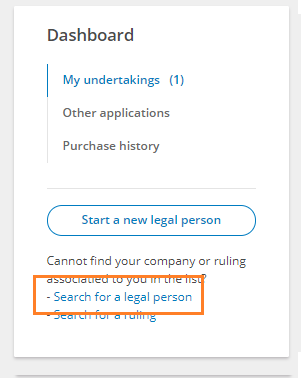
Go to the e-Business Portal and log in using your e-Residency card or Smart-ID. After successful authentication, open the Dashboard.
Step 2: Search for your company
If your company is not listed under My undertakings:
- Click “Search for a legal person” in the dashboard.
- Enter your company’s name or registry code.
- Click the company name in the search results to open its profile.

Step 3: Start changing the company data
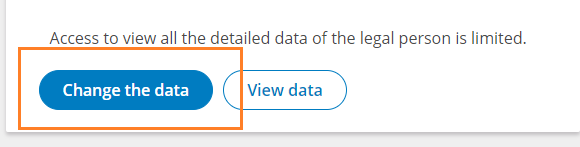
- On the company page, choose “Change the data” to open the amendment application.
Step 4: Update your personal identification number
- Go to the “Persons” section of the application.
- Find your name in the list of board members or shareholders.
- Click “Change” next to your name.
- Set the country of your personal identification number to Estonia.
- Replace the foreign personal code or date of birth with your Estonian personal ID code.
Step 5: Add supporting documentation (if needed)
- Open the “Documents” section.
- Upload a digitally signed free-form letter that:
- Explains that you are linking your Estonian ID code to an existing board member / shareholder.
- Includes your full name, company name and registry code.
- Confirms that no other structural changes are made.
- Select “Resolution of the Body” (or similar appropriate type) for the uploaded document.
Step 6: Confirm and submit the application
- Carefully review all data in the application.
- Digitally sign the application by clicking “Sign”.
- Verify that no state fee is required for this change (updating the personal ID code is usually free).
- Click “Submit application” to send it to the registrar.
Step 7: Wait for registrar approval
The registrar typically processes applications within 1–5 working days. Once approved, your company will appear under “My undertakings” and your e-Residency association will be fully active.
Why linking your ID code matters
Portal access
Completing the e-Residency association allows you to manage the company directly in the e-Business Portal.
Registry accuracy
It ensures compliance with Estonian corporate and registry rules by connecting the right Estonian ID code to the company data.
Future filings
It makes it easier to file annual reports and update company details when changes are needed later.
Completing the association also helps prevent access issues when board members change or new e-Residents join the company.
Important notes
Free of charge
Updating your personal identification number is normally free. If a state fee appears, double-check that it applies to your case.
Accuracy matters
Any mistakes in names, ID codes or roles can delay approval.
Processing time
Standard processing is 1–5 working days, but it can be longer during busy periods.
What to do if you encounter issues
If you run into problems while completing the e-Residency association in Estonia, you can:
- Use the official help materials in the e-Business Portal Help Section.
- Contact the Estonian Business Register support team using the details on their official contact page.
Related Dalanta support
If you also need a legal address and contact person in Estonia after completing the association, you can review the legal address and contact person service.
Frequently asked questions
When do I need to complete the e-Residency association?
You usually need it when the company was registered with a foreign personal code or only a date of birth, and your company does not appear under “My undertakings” after you log in with your Estonian e-Residency identity.
Is the e-Residency association usually free?
Updating your personal identification number is normally free. If a state fee appears in the process, double-check that the selected change type applies to your case.
How long does registrar approval usually take?
The registrar typically processes applications within 1–5 working days, although processing can take longer during busy periods or if clarification is needed.
Does this process change the company structure?
The goal is to link your Estonian personal ID code to the existing board member or shareholder record. If no other changes are made, the company structure itself should remain the same.
Need legal address or contact person service after the association?
Address in Estonia by Dalanta provides legal address, licensed contact person coverage where required, and official mail handling for Estonian companies managed by e-Residents and remote founders.